← Route Maker Pro
Sign In
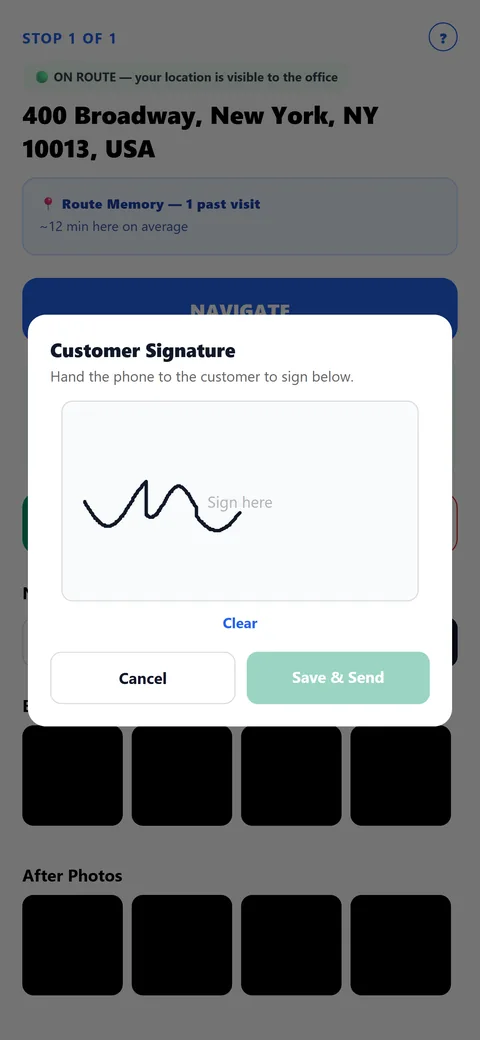
Customer Signature — Optional
Off everywhere until an admin turns it on — company-wide as the default, or overridden for just one route or even a single unusual stop, so a business only using it for high-value deliveries doesn't have to enable it everywhere. When it's required, nothing changes about how a driver documents a stop: photos and notes work exactly as they always do. The only difference comes the moment they tap COMPLETE — after confirming, a signature pad opens right there for the customer to sign with a finger, then Save & Send finishes the stop. That signature becomes one more piece of proof for the visit, uploaded and sent to the office (and customer, if configured) automatically along with everything else already gathered at that stop — no separate step, no extra tap to remember.
Start Free Trial
More features
Smart Route Optimization
Learn more →
One Tap Sends Itself
Learn more →
Route Memory
Learn more →
Live Tracking, Real Privacy
Learn more →
Before & After Photo Proof
Learn more →
No-Service Proof
Learn more →
Service History, One Search Away
Learn more →
Built-In Translation
Learn more →
Driver Privacy, Built In
Learn more →