For the crew 07 / 10
No-Service Proof
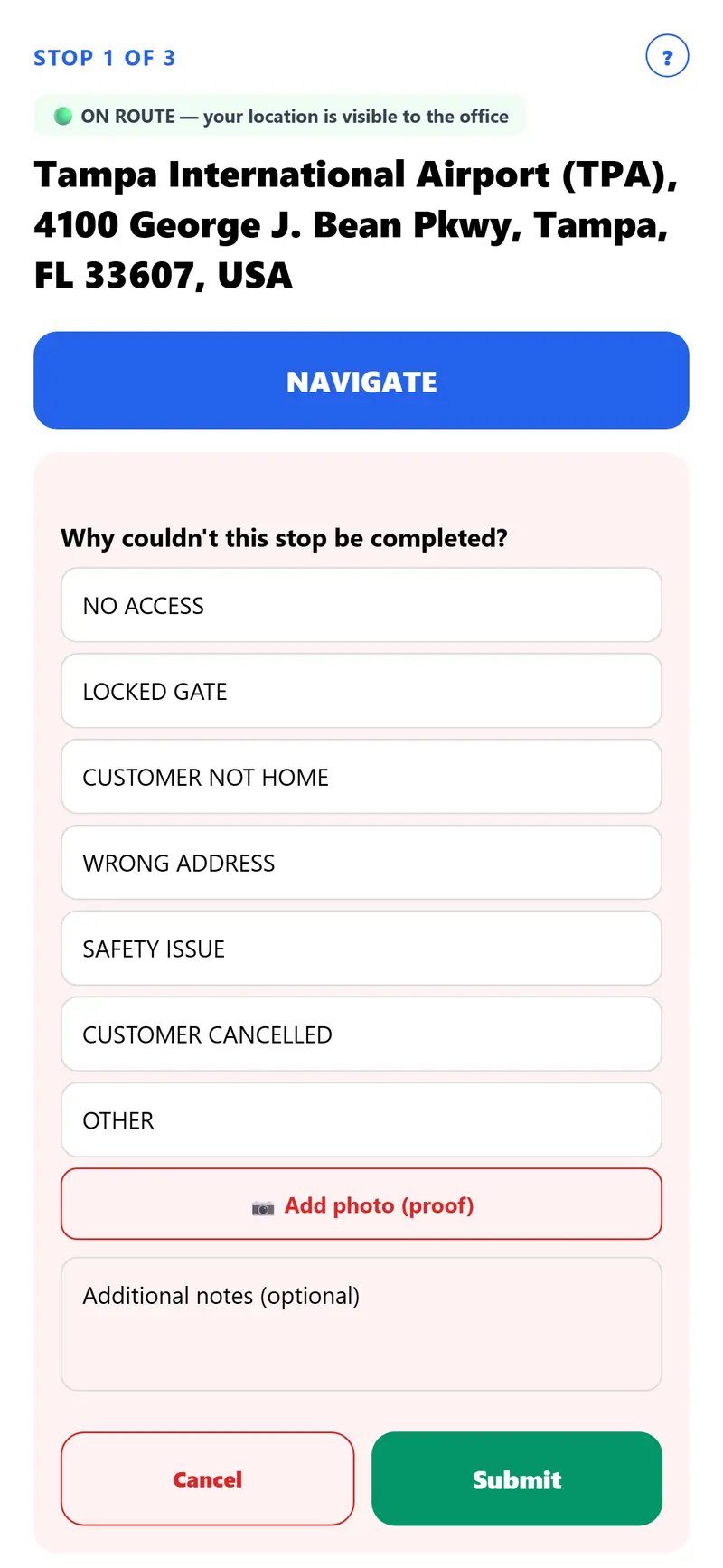
Locked gate? Customer not home? One tap records exactly why, with a photo if needed — so "nobody came" has an answer.
No credit card
In detail
How it works
Not every stop can be completed — a locked gate, a loose dog, a customer who isn't home.
Instead of leaving that stop blank or dropped, a driver taps "Unable to Complete," picks a reason from a list made for your trade (on the standard app: no access, locked gate, customer not home, wrong address, safety issue, customer cancelled, or other), and can optionally attach a photo and notes.
The reason and any photo show in Service history (photos for as long as your plan keeps them), and whoever made the route gets an alert in the phone app — so when a customer says "nobody ever came," there's a real answer instead of a guess.
Every trade
Built for your trade
Same app and same plans, whatever your trade.
- PoolsPool checklist, chlorine and pH, photo report
- Lawn CareMow, edge and trim checklist, mowing height, photo
- Snow PlowingBefore and after photos, snow depth, salt used
- DeliveryDoor photo and where it was left
- House CleaningRoom-by-room checklist and a client email
- Heating & CoolingRated checklist, readings, data plate photo
- Pest ControlService checklist with the products used
- Pet WasteCleanup checklist and a latched-gate photo
- Trash BinsTrash-day routes, bin counts, per-bin pricing
- Home WatchWalk-through checklist, readings, photo report
- Window & ExteriorBefore and after photos, damage noted first
Everything in one app
More features
- Smart Route OptimizationPlans the fastest stop order automatically — the same one tap whether it's 5 stops or 100.
- One Tap Sends ItselfSends all pictures and notes about the stop to the office and/or the customer automatically when the driver hits COMPLETED — nothing to remember, no separate step.
- Route MemoryEvery property builds its own memory over time — "Ms. Smith is picky about her plants, double check before leaving," gate codes, where to park. The next driver sees it automatically, no digging required.
- Arrival Alerts, Real PrivacyThe office sees a driver's location only during a route the driver started, and the iPhone and Android apps check drivers in when they pull up at each stop.
- Before & After Photo ProofBefore and after photos, right from the driver's phone. The email shows the date and time each one was uploaded.
- Customer Signature — OptionalTurn it on company-wide, or just for one route or one stop — off by default. When it's on, signing happens right after COMPLETE and sends along with the stop's photos and notes automatically, no extra step.
- Service History, One Search AwayType in any address and see everything about it — every visit and every note, going back as far as the record goes, plus the photos your plan keeps.
- Built-In TranslationWrite stop instructions in English — a driver set to Spanish, Haitian Creole, or any of 10 other languages reads them already translated.
- Driver Privacy, Built InAn always-visible ON ROUTE / OFF DUTY indicator so drivers always know exactly when they're being tracked — and never when they're not.
Ready to make your routes smarter?
Plans start at $19 a month for one driver.
No credit card